

TL;DR
- TalentLMS 7.3 goes after one kind of admin time: The gap between a question about your training data and an answer you can act on.
- The headline feature is the AI Reports Assistant. Ask who has not finished their training, and get the answer from your portal data in the Reports dashboard.
- Udemy Business courses now run inside TalentLMS, so specialized content sits alongside the rest of a team’s training.
- Underneath, an everyday win: A grid view for the course catalog and category labels on course cards, so browsing stays quick as the library grows.
The latest TalentLMS update to our employee training software introduces three improvements designed to shorten the distance between knowing something and acting on it. The highlights: An AI Reports Assistant for learner progress, Udemy Business courses that run inside your portal, and a clearer way to scan your catalog.
All three move admin time from finding information to using it.
Here is the TalentLMS November 2026 Product Release at a glance:
| Update | What it improves |
| AI Reports Assistant | Ask a question about learner progress and get an answer built from your portal data, with the report behind it one click away |
| TalentLMS × Udemy Business | Run specialized Udemy Business courses inside TalentLMS, with progress sitting alongside the rest of a learner’s training |
| Course Grid View & Category Labels | Scan the catalog as visual cards, with the categories you already use visible on each course |
Introducing TalentLMS 7.3
7.1 was about pace. 7.2 was about creating content, connecting tools, and scaling the admin behind it (September 2026 release). Both were aimed at getting training made and wired into the places people already work.
7.3 is about the three steps that follow. Ask a question the way you would say it out loud. Get an answer built from your own portal. Act on it while the week is still going.
That is where a lot of admin time disappears: Not in building the program, but in checking whether it worked. The courses are live, the data is there, and the daily question becomes what it means and what to change as a result.
💡 Want a live walkthrough? Join our 7.3 product release webinar. Register here.

AI Reports Assistant: Get answers, just by asking
Most weeks, the same questions come up. Who has not completed their required training? Which learners have not logged in for 30 days? Who is enrolled but has not started?
None of them are complicated. What takes the time is the route to the answer. You open Reports, work out which report holds the data, set the filters, run it, export it, and read it closely enough to trust the number before you pass it on. Then the next manager asks a slightly different version of the same question.
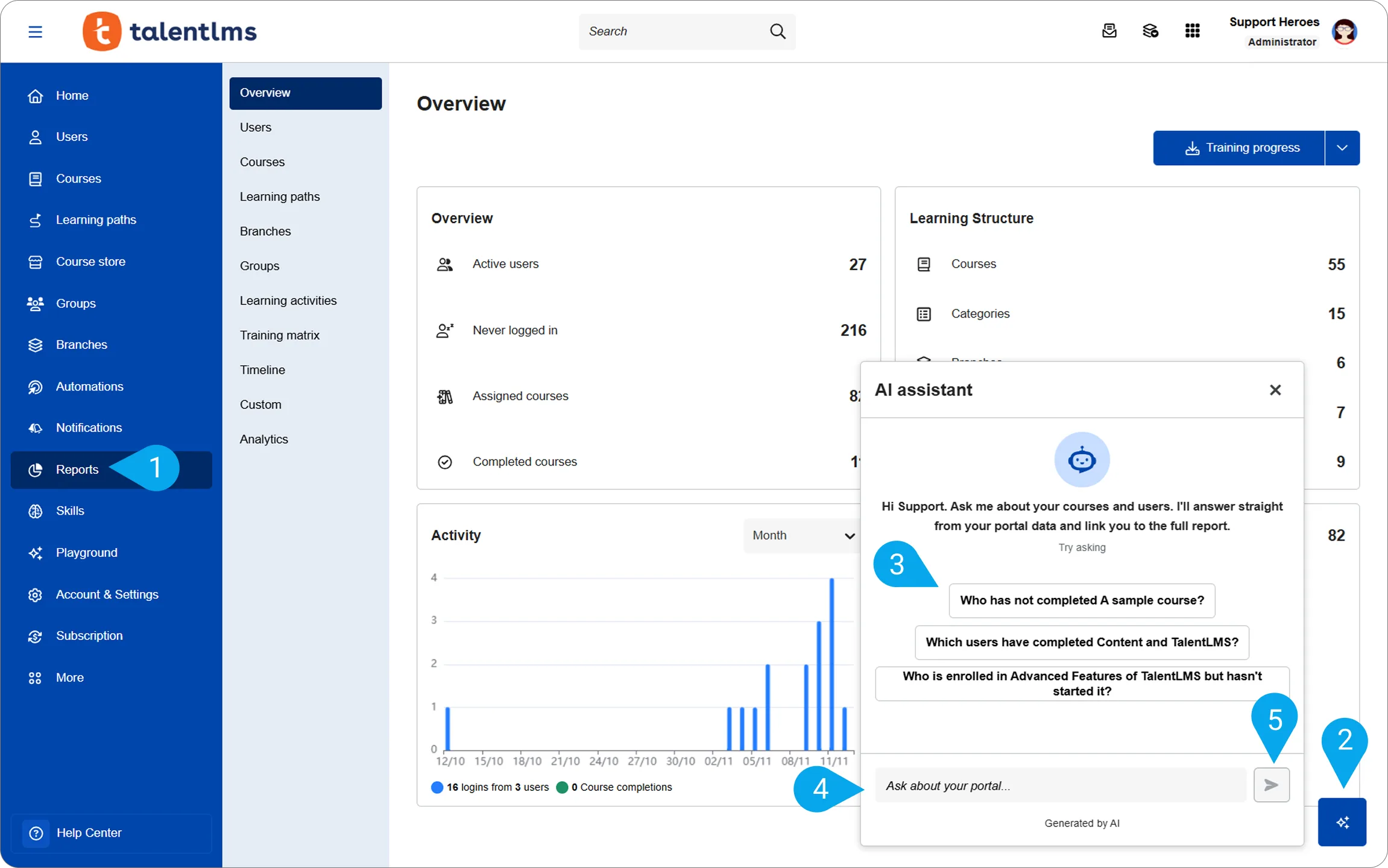
The AI Reports Assistant takes the question in the form you would actually ask it, from the Reports dashboard, and answers from your portal’s data. Along with the answer, you get a link to the report behind it and the option to download the results. Read more on how to use the AI assistant in TalentLMS.
The assistant can help you in many ways.
It is built for the questions that come up most: Who has finished, who has not started, and who has gone quiet. Ask in plain English, and the answer comes back ready to use. What it removes is the step between wondering about something and knowing where to look. When the next manager asks a slightly different version of the same question, it costs a sentence rather than another report. Available on Pro+ plans.
The full report is still the full report. The assistant does not add analytics you did not have, and it does not read across courses to spot a trend. What it removes is the step between wondering about something and knowing where to look.
TalentLMS × Udemy Business: More learning, one place
Most programs run two kinds of learning side by side. Internal training—the onboarding, compliance, and process content you build yourself live in your LMS. Specialized professional development—the technical skills, and deep domain knowledge people need for their next role tend to live somewhere else: A separate platform, a vendor portal, or a folder one person maintains.
That split does not save work. It adds a second login, a second progress report that does not talk to the first, and one more place to chase completion.
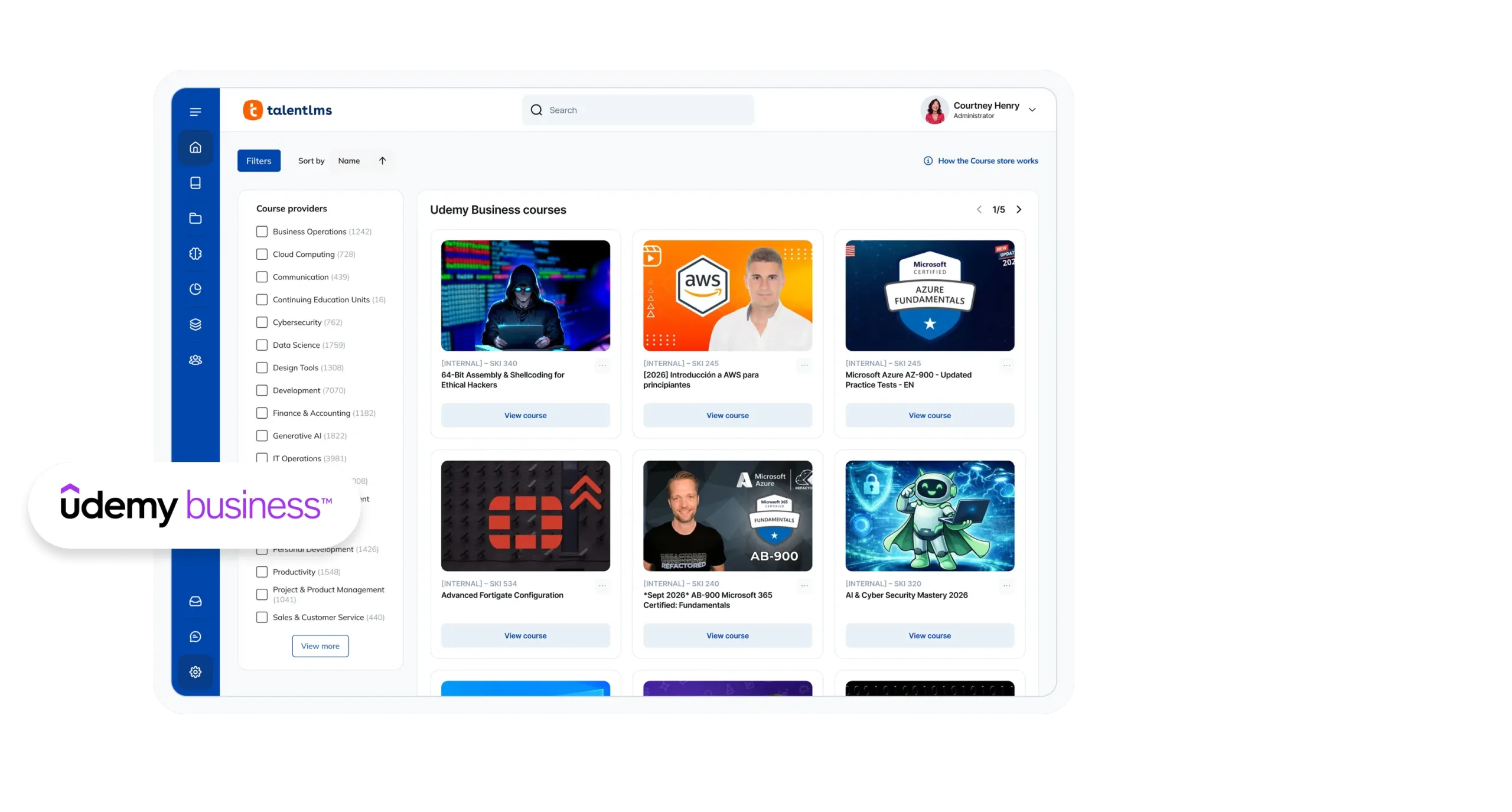
Udemy Business is one of the course solutions TalentLMS brings together, rather than a new destination to manage. It covers specialized depth: Technical skills, professional development, and the domain knowledge people need for their next role. TalentLibrary™ covers the ready-made business skills that get a team moving.
The course solutions on offer keep expanding from there, so widening your catalog does not mean adding another platform. If your organization already has a Udemy Business account, the connection is available on any paid plan. Learn more on how to set up and use the Udemy Business integration in TalentLMS.
The content lands where the training already happens, so a team can pick up new skills without a new destination to manage.

“Access to great learning content is only part of the equation. Businesses also need a simple way to bring that content into their training programs and make it accessible to the people who need it. By integrating Udemy Business with TalentLMS, we’re helping organizations bridge the gap between specialized skills development and everyday training management, so they can spend less time coordinating learning and more time helping their people grow.”
Other improvements
Alongside the bigger features, 7.3 brings an everyday improvement to a tool you already use.
Course Grid View & Category Labels
A course catalog only grows in one direction. The longer the list gets, the more scrolling it takes to find anything.
7.3 adds a grid view, so you can browse courses as cards and read the shape of the catalog at a glance. Category labels put the categories you already use onto those cards, so the grouping you set up shows up where you browse. The result is a catalog that stays easy to navigate as it fills up.
👀 What’s next
We’re already working on our next product features and improvements. Here’s what’s coming next:
- Connect TalentLMS with AI tools like ChatGPT and Claude for you and your learners.
- Add simulations, role-play, and practice sessions directly into your courses.
- Auto-sort users into the right group with Dynamic Groups based on values of select custom fields, so you stop sorting people by hand.
- Compare any period in Reports with the previous one, so you spot the trend instead of reading one number.
A release about the time between knowing and doing
Each feature in the TalentLMS November 2026 Product Release lands somewhere in the space between a question and the work it should trigger.
The AI Reports Assistant cuts the distance from question to answer. Udemy Business widens what you can offer once the answer is that a team needs different skills. Grid view and category labels keep the catalog navigable as it grows.
Course completion tells you something ended. It does not tell you anything changed. The reading, the reassigning, and the adjusting—that is the work between knowing and doing, and it is where training earns its keep. 7.3 is built to give that work more room.