
Your current LMS once ticked all the boxes. Now it’s ticking up costs, causing delays, and keeping your training stuck in the past.
It probably feels less like a helpful tool and more like it’s slowing down the learning experience.
You know you need an upgrade, but the fear of LMS data migration is strong. It whispers stories of lost data, problems with integration, and teams threatening to revolt.
It’s enough to make anyone cling desperately to the familiar, slightly painful, present.
Additionally, relying on legacy technology creates massive technical debt, which McKinsey reports accounts for approximately 40% of IT balance sheets.
Breaking free from your current LMS doesn’t have to be a dramatic ordeal.
This 6-step LMS migration checklist lays out a clear, battle-tested path to a new system, securing a smooth migration process.
What is LMS migration?
LMS migration is the process of moving courses, user data, completion records, and learning paths from one learning management system to another. A successful migration follows six stages: preparation and planning, data and content migration, testing and validation, training and communication, go-live, and post-migration support. Key success factors include data auditing, pilot testing, stakeholder training, and selecting a platform with transparent pricing and fast deployment.
Why switch your LMS? Often, the trigger is straightforward. The existing LMS just doesn’t work anymore.
Perhaps it also:
- Struggles to keep up as your team and training needs grow
- Delivers reporting so bare-bones, it’s barely useful
- Leaves users frustrated and disconnected
- Doesn’t integrate well with the tools you rely on
- Costs more per user than it’s worth
If several of these apply, it may be time to consider a new LMS that keeps pace with your business.
If these problems sound familiar, they’re not quirks. They’re structural issues that compound over time. And the longer you wait, the wider the gap gets between what your LMS delivers and what your business needs.
The good news? LMS migration is more manageable than you think.
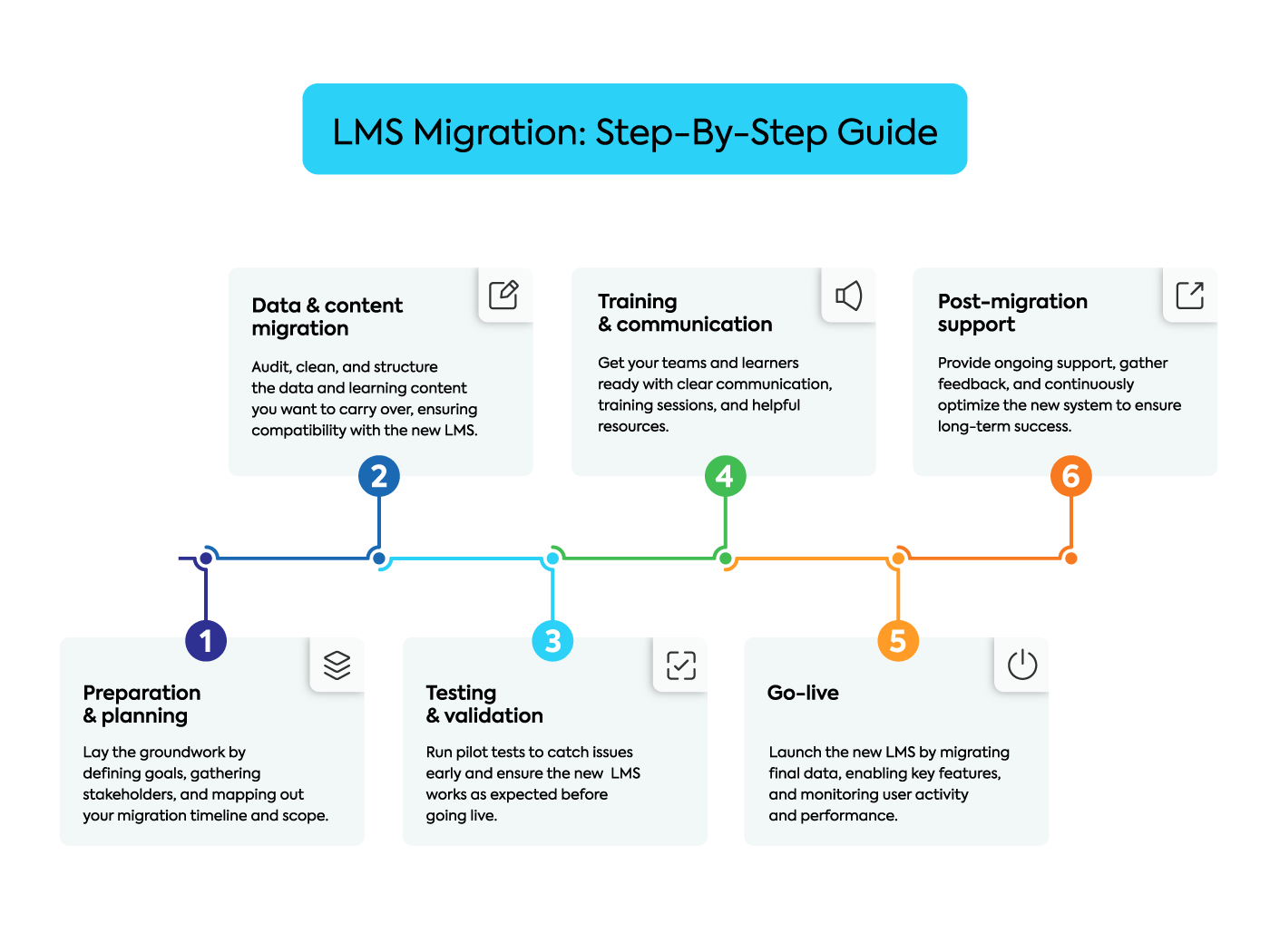
Your LMS migration checklist: 6 easy steps
Now, let’s break down this LMS migration problem into manageable chunks; an LMS migration project plan.
1. Preparation & planning
Think of this stage as drawing up the blueprints before constructing a building. Rush this foundational step, and you’re engineering pain for later.
Before anything else, clearly articulate why you’re migrating. Go beyond vague notions like “we need a better system.”
Define specific, measurable goals. Perhaps:
- “Reduce admin time spent on reporting by 25%”
- “Achieve an 85% course completion rate within 12 months”
- “Implement seamless single sign-on integration with our core HRIS”
Next, build your migration team. Traditional LMS setups often require heavy IT support and deep pockets. With TalentLMS, setup is simple, costs are transparent, and tech support can take a back seat. That means your core team (L&D, finance, and key department reps) can take the lead without getting buried in complexity.
Lastly, map out a realistic timeline—factoring in vendor selection, data cleansing, testing phases, and user training—and define your scope rigorously.
2. Data & content migration
Next up, the main event—shifting the actual digital stuff. This isn’t merely a copy-and-paste exercise. It’s a deliberate curation process.
First, conduct a thorough audit of everything lurking within the dusty corners of your current LMS:
- User profiles (active, inactive, duplicates?)
- Course files (all those various SCORM packages, videos, PDFs)
- Historical completion records
- Assessment results
- Structured learning paths
Then, decide what data and which content must absolutely make the journey.
Be brutally honest here. Is that compliance course from 2015, last updated never, really adding value? Does anyone still need access to the ‘Introduction to Fax Machines’ module?
Next comes the cleaning crusade.
Standardize naming conventions that went rogue years ago, purge those phantom user accounts, fix inconsistent data entries (like ‘UK’, ‘United Kingdom’, ‘GB’), and archive or securely delete genuinely irrelevant content.
It’s painstaking, but migrating messy, inconsistent data is like pouring curdled milk into a perfect cup of tea – it contaminates everything.
Lastly, check with your new vendor about LMS migration ease. You’ll want to know how data needs to be structured for their import tools and confirm content compatibility, particularly for older eLearning formats.
3. Testing & validation
You’ve moved the digital furniture into the new house—now it’s time to check the light switch on and the taps don’t leak.
Assemble diverse pilot groups for this. Don’t just rely on your project team, who are already intimately familiar (and possibly biased). Include end-users from various departments, different job roles, and varying levels of technical comfort to get genuine feedback.
Your testing blitz must cover several fronts.
Verify data integrity:
- Are user profiles accurate down to the last detail?
- Did historical completion data and course enrollments transfer correctly?
- Check names, reporting lines, user groups—the works
Test content functionality across different browsers and devices (desktop, mobile, tablet):
- Do courses launch properly?
- Does progress track accurately?
- Do assessments submit and score correctly?
- Prod and poke any integrations—does single sign-on work seamlessly?
- Is data flowing correctly to and from your HRIS or other connected systems?
Finally, evaluate the core user experience:
- Can people log in without needing a complex manual (e.g. SSO)?
- Is navigation simple, easy, intuitive?
Capture feedback, systematically track bugs, and this is key, validate the fixes before you even think about going live. Catching a showstopper now prevents widespread operational chaos later.
4. Training & communication
Even the most technically perfect, brilliantly implemented new system will stumble and fall if your users are left confused or resistant. Introducing the new LMS effectively requires more than just a hastily written launch email fired off into the void—it demands a deliberate communication strategy and targeted training programs.
To help manage expectations, start explaining the ‘why’ behind the change well in advance—focus squarely on the benefits for the users themselves, not just the lofty business rationale.
Clearly outline the project timeline, key dates, and manage expectations about the switchover process.
Importantly, tailor your communications and training to fit each role. For example:
- LMS administrators need the in-depth technical details
- Managers require insights into tracking team progress and reporting
- End-users primarily need the core basics of logging in, finding courses, and navigation
Provide practical, role-specific training sessions (live webinars, recordings, or workshops) and create easily digestible support resources like FAQs, quick reference guides, or short ‘how-to’ videos addressing common tasks.
5. Go-live
Now it’s finally showtime. All the careful planning, data gathering, testing, and communication ends in this carefully planned launch sequence.
This phase usually involves performing a final ‘delta’ data migration. This important step captures any last-minute user registrations, course completions, or other important data changes that happened in the old system since the main LMS migration.
Then, you officially open the virtual doors:
- Configure the final user access permissions
- Activate all key features and essential integrations like single sign-on (SSO)
- Double-check that automated notification systems are firing correctly
- Ensure users are directed to the new LMS platform address
Post-launch isn’t the finish line. Keep your core team engaged and stay in touch with your LMS provider. The good news? With TalentLMS, there’s no need for ongoing IT intervention.
Before the LMS migration process is final, be sure to:
- Monitor system performance (speed, stability, errors)
- Track user activity patterns (logins, course access rates), and
- Manage the initial wave of support queries.
6. Post-migration support
The new system is live, and the initial flurry of activity (and perhaps frantic support tickets) is subsiding. But the work isn’t quite finished. A successful LMS migration project now evolves into a phase of continuous improvement and optimization.
The launch may be behind you, but making the system work well for everyone is an ongoing effort.
Maintain dedicated support channels for a defined period post-launch, ensuring that knowledgeable staff can handle queries about the new platform promptly and effectively.
Actively solicit feedback once everyone has had a reasonable amount of time to use the new system in their daily routines.
Use targeted surveys, feedback forms embedded within the LMS, or informal check-ins via managers. Ask specific questions about usability, navigation, feature usefulness, and any remaining pain points.
This insight is gold dust for identifying optimization opportunities:
- Perhaps tweaking system configurations
- Improving help resources based on common questions
- Planning brief follow-up training sessions on underutilized features
Finally, revisit those original goals defined way back in Step 1. Is the new LMS delivering the improvements you aimed for?
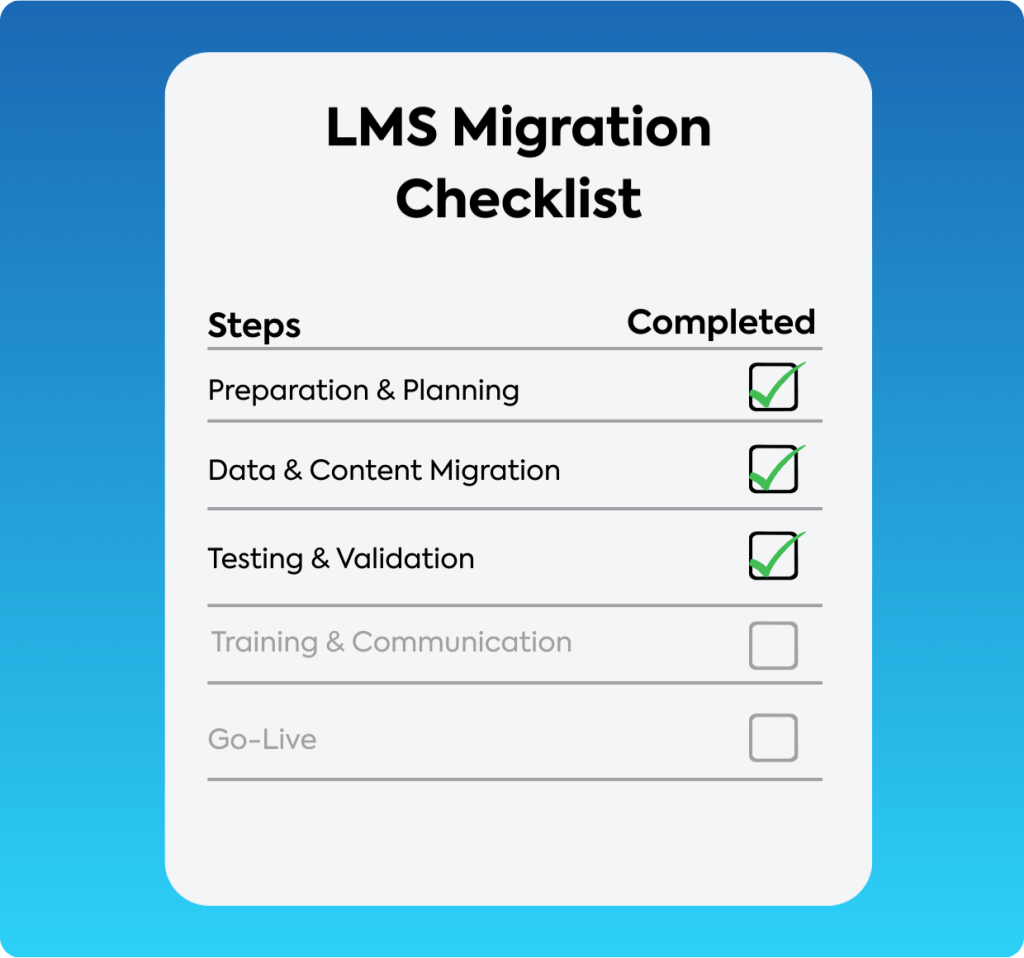
To help you manage this entire process from start to finish, grab our detailed checklist:
3 tips for migrating to a new LMS
Successful LMS migration hinges on picking the right destination platform. This LMS vendor selection process is your chance to get rid of the problems of your existing LMS platform and buy a tool that really helps your organization’s learning goals.
Here are the factors to weigh up when building your LMS implementation project plan.

Assess LMS features
Remember those specific goals and requirements you defined back in the LMS migration planning Step 1? Now is the time to map them directly against the LMS features offered by potential new LMS vendors.
Your scrutiny needs to cover core functions:
- Assess the intuitiveness of course and user management tools
- Verify the depth and flexibility of the reporting suite
- Confirm the potential for integration with your HRIS
- Check if the necessary branding customization is available
- Look for built-in AI-powered course authoring and content generation
- Practice-based learning and simulation features
- Skills mapping and competency tracking
But a feature list only ever tells part of the story. Practical experience is key, which makes free trials and personalized demos invaluable.
Prioritize LMS vendors who allow you to properly ‘test drive’ their platform before any commitment.
That’s where TalentLMS stands out. Unlike most platforms that only offer a time-limited trial, TalentLMS combines a forever-free plan, a 14-day premium trial, and the option for a personalized demo—so you can explore the platform from every angle and make an informed decision.
Always try before you buy.
Ensure you understand the provider’s pricing
The Learning Management System’s pricing models can sometimes feel notoriously opaque. You’ll find many vendors avoid publishing clear costs directly on their websites, often preferring to guide you towards sales conversations to unveil the numbers.
The initial subscription or license figure presented might only represent a fraction of the true expense.
Reading up on common hidden LMS costs can arm you with the right questions.
Whichever LMS provider you consider, always insist on receiving a fully itemized, comprehensive quote detailing all potential charges anticipated over the contract’s lifetime.
Assess the expected ROI
Beyond scrutinizing features and untangling pricing models, the ultimate consideration often comes down to value. Calculating the potential Return on Investment (ROI) helps you justify the expenditure and logically compare different LMS options.
Link this assessment directly back to the specific business goals you defined earlier:
- How precisely will this new system reduce tangible training delivery costs
- Accelerate crucial employee onboarding times
- Improve vital compliance completion rates (potentially avoiding fines)
- Demonstrably elevate productivity through targeted upskilling
Try to quantify these anticipated benefits as accurately as possible.
A critical, often overlooked, element of ROI is the time-to-value.
A system bogged down in a lengthy and complex implementation process significantly delays any potential return.
Therefore, look closely at factors that accelerate this payback period. Rapid deployment capability is key—some platforms, such as TalentLMS, report launch times faster than the industry average.
When such speed is combined with cost-effective (yet still powerful) functionality, your path to seeing a positive ROI becomes considerably shorter. Training engagement drives broader business engagement, and highly engaged business units achieve 23% higher profit than their bottom-quartile counterparts, largely driven by lower turnover and higher productivity.
Clear, published pricing structures, like those offered by TalentLMS, make forecasting that expected ROI much more reliable and predictable. This lets you build a strong business case without worrying about hidden costs that could hurt your financial projections later.
Get the right LMS for your needs
The wrong LMS creates friction, bottlenecks the flow of knowledge, and generally makes everything feel like an uphill slog.
The right system acts as a natural facilitator—delivering learning efficiently, tracking progress intelligently, integrating smoothly, and ultimately making the entire organization sharper, more capable, and ready for what’s next.
Choosing the best Learning Management System wisely today isn’t just about meeting the requirements or avoiding another LMS migration headache in three years. It’s about installing an LMS that truly helps your people and helps your business grow.
So, find a system that lets your talent flow freely.
FAQs
How do I know if I need a new LMS or just need to use my current one better?
Start by identifying whether the issues you’re facing are structural or configurational. If your LMS struggles with basics (scaling, reporting, integrations), you might require better configuration or training. But if three or more of these problems apply, the root cause is structural. No amount of workarounds will fix a platform that cannot scale, integrate, or report in the way your company requires.
How long does LMS migration typically take?
It varies according to the size of your content library and user base. The key is preparation. Audit your existing content and remove any outdated material before moving anything. A 6-step migration checklist makes migration faster and more efficient.
Will I lose my existing training data during migration?
Not if you plan ahead. The data migration process entails exporting course content, user records, and completion history from your existing platform and importing them into the new one. Testing in a sandbox environment prior to go-live identifies any gaps before they affect learners.
How do I get my team on board with switching LMS platforms?
Start with evidence. It’s one thing to tell your team that you’re changing things, but it’s more convincing to show them how the current system is limiting training. Then, get key stakeholders involved early on in the vendor evaluation process, and build in sufficient training time prior to go-live so no one is thrown into a new system cold.
What should I look for in a modern LMS to avoid the same problems again?
Concentrate on the gaps you identified in your current system. If scaling was a concern, look for automated enrollment and multi-branch support. If course creation has been slow, prioritize AI-powered authoring tools. If reporting was inadequate, consider real-time analytics. Also, make sure that pricing is transparent and published so you aren’t caught off guard as you scale.