
LMS implementation isn’t about installing software. It’s about laying firm foundations for a learning platform that grows with your business.
With the right LMS in place, training becomes easier to launch, manage, track, and scale. It also helps organizations respond faster to changing business needs, from onboarding new hires to rolling out compliance training and closing skill gaps.
But getting there takes more than choosing the right platform. It takes a successful LMS implementation that balances careful planning with speed.
That speed is increasingly important. The TalentLMS Learning Debt Report found that 41% of employees say their role has evolved faster than their company’s ability to train them.
That’s where a well-planned LMS implementation makes all the difference. It provides a clear roadmap for launching your LMS while shortening the time between identifying a training need and fulfilling it.
Whether you’re implementing an LMS for the first time, planning an LMS deployment, or replacing an existing platform, this guide will walk you through every stage of a successful rollout. You’ll also find a downloadable implementation checklist and communications plan to help keep your project on track.
Key takeaways
- LMS implementation is an ongoing process, not a one-time project
- Start with one high-impact use case, such as onboarding or compliance
- Avoid migrating outdated content or over-customizing before launch
- Use automation and integrations to reduce administrative work
- Continuously measure and improve your learning program after go-live
What is LMS implementation?
LMS implementation is the process of planning, configuring, launching, and optimizing a learning management system so it’s ready to support your organization’s learning goals. The scope of all of these elements will depend on size of the organization at the time of the implementation. But company growth should also be considered as a factor at the time.
LMS implementation is more than purchasing software or importing users. A successful implementation brings together people, processes, content, and technology to create a learning experience employees will actually use.
While every organization has different requirements, and every training platform is unique, most implementations follow the same stages:
- Define business goals
- Align stakeholders
- Configure the LMS
- Prepare content
- Import users
- Connect business systems
- Test the platform
- Launch training
- Measure and improve
A well-planned LMS implementation helps organizations launch training faster, improve learner adoption, reduce manual administration, and build a learning program that can scale alongside the business.
How long does LMS implementation take?
LMS implementation timelines vary depending on your organization’s size, existing training content, integrations, and internal resources.
Cloud-based LMS platforms are typically quicker to deploy than local or on-premise LMS platforms because hosting, security, and updates are managed by the provider. Platforms with intuitive administration, built-in automation, and ready-made integrations can often be implemented much faster than systems requiring extensive customization.
For most SMBs using a cloud-based LMS, implementation can be completed in a matter of weeks rather than months, especially when using built-in integrations and automation.
Rather than trying to launch everything at once, many larger organizations start with a high-priority use case and expand over time. For example, employee onboarding or compliance. This phased approach reduces complexity while delivering value sooner.
Before you start: Build your LMS implementation plan
Successful implementation starts before you configure the platform. A clear LMS implementation plan helps align stakeholders, prioritize work, and reduce surprises later in the project.
Set your business goals
Start your LMS implementation plan by defining what success looks like.
Your goals might include:
- Speeding up employee onboarding
- Improving compliance training
- Supporting customer or partner education
- Scaling employee development
- Delivering consistent training across multiple locations
- Reducing administrative workload
- Closing skills gaps
Your implementation roadmap should support your business objectives, not the other way around.
Assemble your implementation team
LMS implementation works best when it’s treated as a business initiative rather than an L&D project. In smaller organizations, one person may take on several of these responsibilities, while larger organizations often share them across multiple teams.
You don’t have to manage implementation alone. A good LMS provider should offer onboarding resources, implementation guidance, and customer success support to help your team launch confidently.
Define success metrics
Before implementation begins, decide how you’ll measure success.
Common KPIs include:
- LMS launch date
- Active users
- Learner adoption
- Course completion rates
- Learner satisfaction
- Time-to-launch
- Time-to-first-course completion
- Administrator time saved through automation
Tracking these metrics from the start helps you measure both implementation progress and business impact. Over time, you’ll be able to show not just that your LMS launched successfully, but that it’s helping employees learn faster, reducing administrative effort, and supporting your organization’s growth.
LMS implementation in 8 steps

Once you’ve built your implementation plan, it’s time to put it into action. These eight steps will help you implement your LMS efficiently, avoid common pitfalls, and build a learning program that’s ready to grow with your business.
Step 1: Audit your current training
If you’re planning an LMS migration, take stock of your existing training first.
Review your:
- Courses and learning materials
- Compliance training
- Onboarding programs
- Assessments and quizzes
- Training records
- Learning audiences and user groups
Ask one simple question:
Does this content still support today’s business goals?
If the answer’s no, don’t migrate it.
Implementation is the perfect opportunity to retire outdated courses, remove duplicate content, and reorganize learning around current priorities. A cleaner content library is easier to manage, easier for learners to navigate, and much easier to scale over time.
It’s also worth gathering feedback from managers and employees. Understanding where learners struggle today will help you create a better experience from day one.
Step 2: Configure your LMS
Once you’ve reviewed your content, it’s time to configure the platform.
Start with the essentials rather than trying to customize every feature before launch.
Focus on creating a simple, intuitive learning environment that’s easy for employees to navigate and easy for administrators to manage.
This includes setting up:
- User roles and permissions
- Departments, learning groups, or branches
- Reporting access
- Course categories
- Learning paths
- Company branding
Organize courses in a way that makes sense for your business. This could be by department, job role, skill, or compliance requirement.
A simple, well-organized LMS is far more valuable than a heavily customized one that takes months to launch.
Step 3: Prepare your learning content
Before launching, make sure your learning content is ready for the new platform.
Review every course for:
- Accuracy
- Accessibility
- Mobile compatibility
- Branding
- Assessments
- Completion criteria
If you’re migrating existing eLearning content, check that SCORM (or other supported formats) imports correctly and tracks learner progress as expected.
This is also a good opportunity to modernize older content by incorporating videos, interactive quizzes, knowledge checks, and scenario-based learning.
Many organizations are also using AI to accelerate course creation, as a learning playground, or by generating draft content or quiz questions. Just remember that AI should support subject matter experts, not replace them.
Your goal isn’t to fill your LMS with as much content as possible before launch. It’s to provide learners with the right content at the right time.
If you’re starting from scratch or replacing outdated courses, a built-in course library can help you launch training faster without having to create every course yourself. You can then supplement it with your own organization-specific content over time.
Step 4: Import users and connect your systems
With your LMS configured, it’s time to populate the platform and connect it with the systems your business already uses.
Import:
- Employee records
- Teams and departments
- User groups
- Certifications
- Relevant training history
Where possible, use pre-built integrations available in your cloud LMS rather than relying on custom development. For example, you can connect your LMS to tools such as:
- HRIS
- Single Sign-On (SSO)
- Microsoft Teams
- Zoom
- Google Workspace
- CRM platforms
Using integrations like these helps automate user provisioning, reduce manual administration, and create a smoother learner experience from day one.
Step 5: Automate routine tasks
One of the biggest advantages of a modern LMS is reducing repetitive administration through automation.
Setting up automated workflows during implementation reduces administrative effort and makes your learning program easier to scale.
Common automations include:
- User enrollments
- Welcome emails
- Learning paths
- Reminder notifications
- Certification renewals
- Compliance assignments
- Manager notifications
The more routine work your LMS automates, the less time administrators spend managing training. And the more time they can dedicate to supporting learners and measuring business impact.
Step 6: Test before you launch
Before rolling out your LMS across the organization, test it with a representative group of users.
Check that:
- Courses launch correctly
- Assessments record results
- Automations work as expected
- Reports capture accurate data
- Integrations function properly
- The platform is easy to navigate
Ask pilot users for feedback about the overall learning experience, not just whether they completed a course.
Identifying and fixing issues before launch improves learner confidence and reduces support requests later.
Step 7: Launch your LMS
Launching your LMS is where careful planning turns into real learning experiences. Resist the temptation to wait until every feature has been configured. Launching sooner allows you to gather feedback, improve the experience, and deliver business value faster.
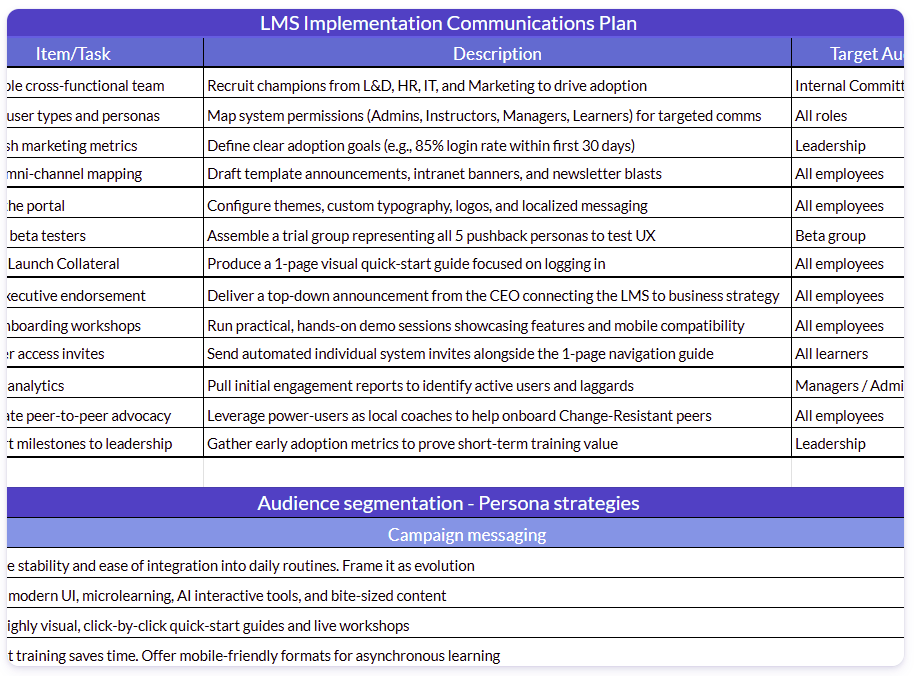
Support your rollout with a clear communications plan that explains:
- Why the LMS is being introduced
- What employees need to do
- Where they can get help
Clear communication encourages adoption and helps learners feel confident using the platform from day one.
Step 8: Measure and improve
The most successful LMS implementations continue evolving long after launch.
Monitor key metrics such as:
- Active users
- Course completion rates
- Learner satisfaction
- Assessment performance
- Administrator time saved
- Compliance completion
Combine this data with learner and manager feedback to identify opportunities to improve content, simplify administration, and expand your learning program as business needs evolve.
Implementation isn’t about reaching a finish line. It’s about building a learning program that can adapt as your business grows.
This simple eight-step LMS implementation guide helps you launch faster, reduce unnecessary complexity, and build a learning platform that’s ready to support your organization today and in the future.
6 common LMS implementation mistakes to avoid
Even with the right platform, LMS implementation can lose momentum if common mistakes go unchecked. Here are six common pitfalls and how to avoid them.
1. Treating implementation as an IT project
An LMS implementation involves technology, but it shouldn’t be driven by technology alone.
Successful implementations bring together HR, L&D, IT, and business leaders to align the platform with organizational goals, not just technical requirements.
How to avoid it: Keep your focus on the business outcomes you want to achieve, and let those guide implementation decisions.
2. Migrating everything
Moving every course and training record into your new LMS often creates unnecessary complexity.
How to avoid it: Use implementation as an opportunity to review your content. Keep what’s relevant, archive what’s outdated, and launch with a clean, well-organized learning library that supports your current business priorities.
3. Skipping stakeholder buy-in
Managers play a critical role in driving learner adoption.
How to avoid it: Involve key stakeholders early by gathering input on training needs, onboarding challenges, and reporting requirements. When managers understand the value of the LMS, they’re more likely to encourage participation and reinforce learning.
4. Ignoring the learner experience
A well-configured LMS won’t succeed if employees struggle to use it.
How to avoid it: Before launch, make sure learners can easily find their training, complete courses on any device, and understand what to do next. Small improvements to usability often have a bigger impact on adoption than adding more features.
5. Launching without a pilot
Rolling out your LMS to the entire organization without first validating the experience can make small issues much harder to fix once learners are using the platform.
How to avoid it: Use a pilot to validate content, integrations, reporting, and navigation, then refine the experience based on real user feedback before rolling it out more broadly.
6. Measuring only completion rates
Course completions are useful, but they don’t tell the whole story.
How to avoid it: Track learner engagement, assessment results, compliance status, and administrator efficiency alongside business outcomes such as onboarding speed or time-to-productivity. Reviewing these metrics regularly helps you continuously improve your learning program.
Download your LMS implementation checklist
Even the best implementation plan is easier to manage when every task, owner, and milestone is documented. Keeping an LMS implementation on track is much easier when everyone is working from the same plan.
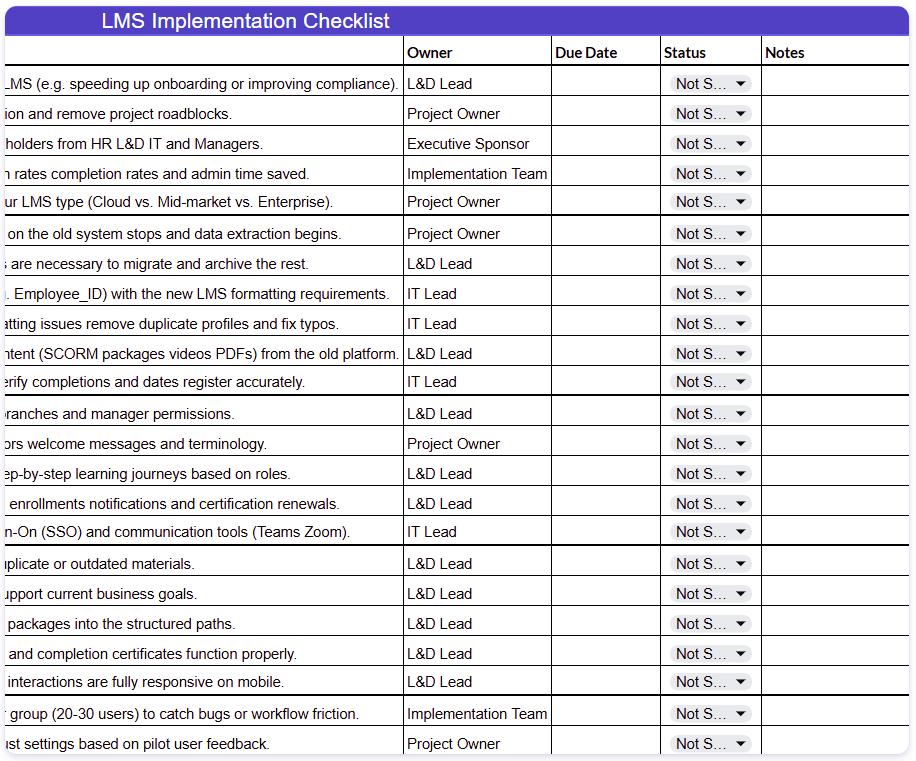
Our downloadable LMS implementation checklist and communications plan resource provides the transparency needed to manage an LMS rollout, from planning and platform setup to launch and post-launch optimization.
Use it to:
- Track implementation tasks
- Assign responsibilities
- Monitor key milestones
- Plan stakeholder communications
- Prepare for a successful launch
LMS implementation tips for long-term success
LMS implementation should be the foundation for a learning program that evolves with your business. It doesn’t end at launch. These best practices will help you maintain momentum, support learners, and continuously improve training as your organization grows.
Prioritize business outcomes over perfect configuration
It’s easy to spend weeks refining settings that few learners will ever notice.
Instead, focus on creating a learning experience that helps employees learn faster and supports your business goals.
Roland took this approach when it needed to quickly transition sales training online. Rather than choosing a platform that required extensive setup, the team prioritized one that was ready to deploy so they could start delivering learning immediately.

Customer Quote
“We needed a platform that was ready for deployment, rather than building something from scratch. Within a week, we had TalentLMS up and running. We were able to build our portal and have courses in it literally within the first week.”
By getting their LMS up and running quickly, Roland developed ten courses in the first week, helping its sales teams respond to rapidly changing market conditions.
A successful implementation isn’t measured by how much you configure before launch, it’s measured by how quickly you start delivering effective learning.
Keep administration simple
As your learning program grows, every manual task adds to your team’s workload.
Automate user provisioning, enrollments, reminders, certifications, and reporting wherever possible. Reducing administration frees your team to focus on creating better learning experiences instead of managing routine tasks.
Build for growth
Your LMS should support your business today and adapt as your needs evolve.
Pick an implementation approach that makes it easy to add new teams, locations, learning audiences, and training initiatives without creating unnecessary complexity.
As Global Shop Solutions expanded its training program, it used TalentLMS to create separate learning environments for different audiences, making it easier to scale onboarding and ongoing development.

Customer Quote
“I knew eventually that we would want to offer this LMS to our customers once we got our catalog built out. Our CEO saw what the LMS was doing internally, and he wanted to offer that to our customers. So he gave me 90 days to get courses into the LMS to make it a marketable product for our customers. That was a bit of a crunch getting that done, but because TalentLMS is so easy to use, we were able to execute that, and we had something within 90 days for our customers.”
A scalable implementation gives you the flexibility to grow your learning program without outgrowing your LMS.
Continuously improve
The best LMS implementations continue evolving long after launch.
Review learner feedback, monitor adoption, and track key performance metrics to identify opportunities for improvement. Small, continuous changes help keep learning relevant, improve engagement, and ensure your LMS continues to support changing business priorities.
From implementation to impact
A successful LMS implementation isn’t about building the perfect system before anyone logs in.
It’s about creating a strong foundation that helps your organization deliver learning when it’s needed most.
That starts with clear goals, thoughtful planning, and a phased approach that prioritizes business value over unnecessary complexity.
As your organization grows, your LMS should help training keep pace, not hold your learning strategy back.


![Managing Teams in the AI Era [+ Manager Checklist]](https://www.talentlms.com/blog/wp-content/uploads/2026/08/Managing-people-who-work-with-AI-19Aug2026-BIG-768x402.png)